Cart editor
Overview
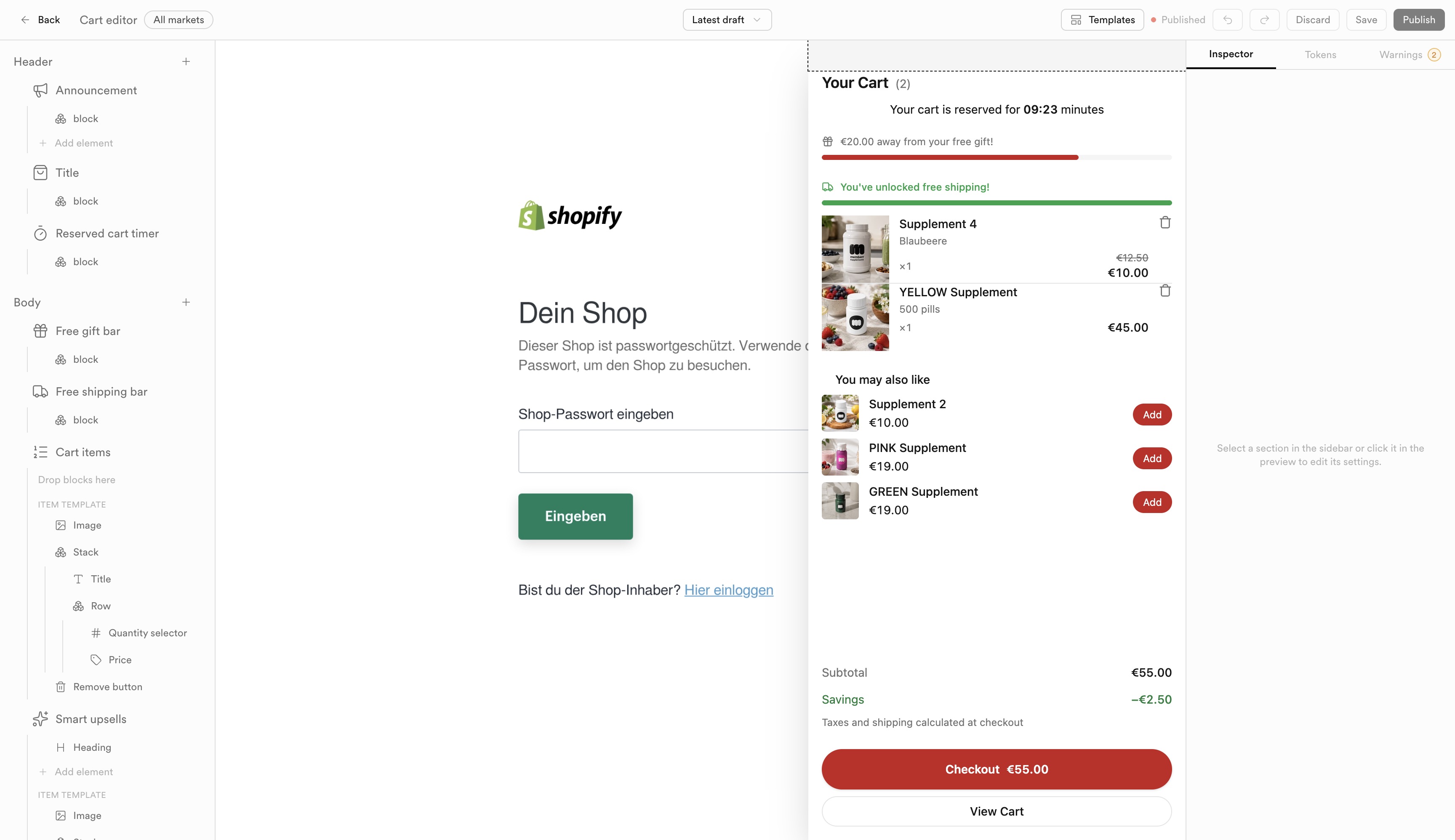
Cart editor layout: section tree, live drawer preview, and publish controls.
Open Cart Editor to build the drawer customers see on the storefront. The center preview is the live drawer (no separate storefront screenshots in these docs).
Layout
| Area | Role |
|---|---|
| Section tree | Header and Body hierarchy (announcement, title, timer, progress bars, cart items, smart upsells, …). |
| Preview | Live drawer over your shop - item count, timers, gift/shipping bars, line items, upsells, checkout CTA. |
| Inspector | Edit the selected block (content, design). Tokens and Warnings tabs sit beside it. |
| Top bar | Market selector, Templates, layout versions / draft, Undo/Redo, Discard, Save, Publish. |
Use All markets or a specific market when layouts differ by region. A green Published indicator means the live storefront is serving the current published version; unpublished draft changes need Publish.
Tip
Save often while iterating; Publish only when the preview matches what you want shoppers to see.