Translations
Localise customer-facing labels and copy for memberr Loyalty UI extensions and metafields.
Use the Translations page in the memberr app to localise every customer-facing string that memberr shows in Shopify customer accounts, checkout, and related metafields - without editing Liquid or extension code.
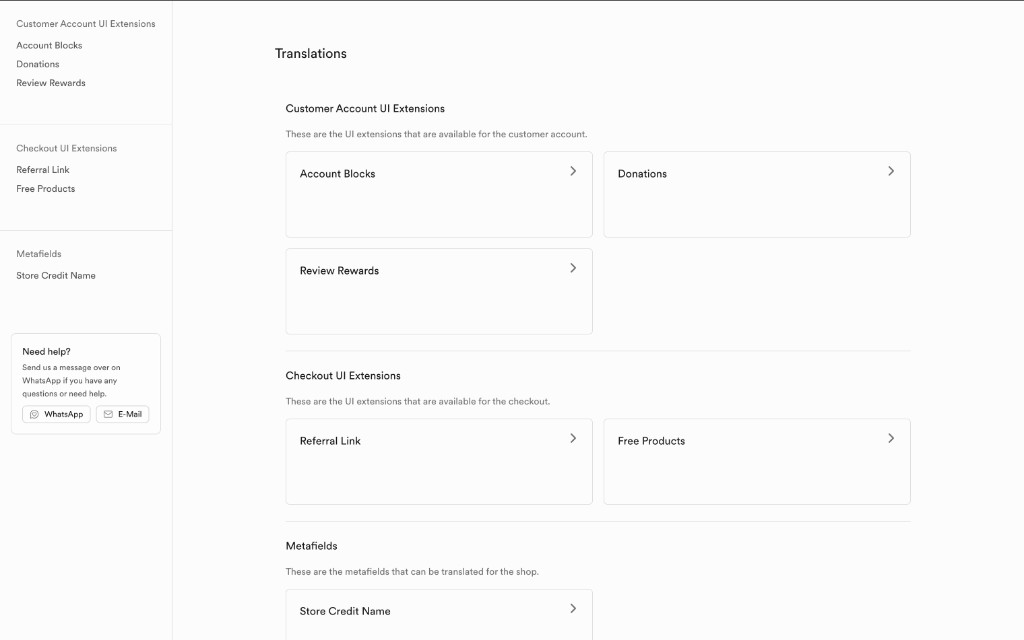
Open Translations
- Open the memberr app in Shopify Admin.
- In the sidebar, go to Translations (globe icon).
- Grant the
write_translationsandwrite_localesscopes if Shopify prompts you - these are required to save locale content.
The overview groups everything you can translate into three sections.
What you can translate
Customer Account UI Extensions
Strings shown in the customer account profile blocks:
| Area | What it covers |
|---|---|
| Account Blocks | Store credit, membership, referral, and birthday sections |
| Donations | Donate-with-store-credit flow (titles, labels, validation messages) |
| Review Rewards | Review rewards block (title, description, CTA) |
Checkout UI Extensions
Strings shown during checkout:
| Area | What it covers |
|---|---|
| Referral Link | Checkout referral block (heading, description, rewards info) |
| Free Products | Membership free-product picker at checkout |
Metafields
| Area | What it covers |
|---|---|
| Store Credit Name | The shop-level name customers see for store credit (e.g. “Store Credit”, “Guthaben”) |
Edit a translation set
- From the overview, open a card (for example Account Blocks).
- Each row is a Field. Columns are locales (your primary language plus any additional languages you enable).
- Edit the text in a locale column, then click Save for that locale.
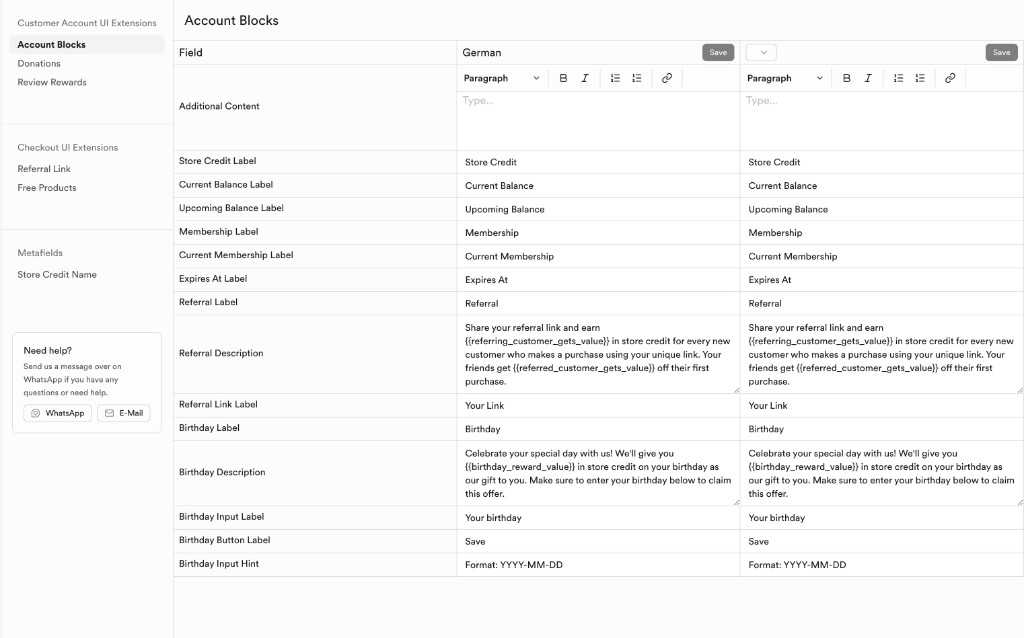
Default (primary) locale values are stored on the underlying Shopify metaobject or metafield. Additional locales are registered through Shopify’s Translations API - the same system Translate & Adapt uses - so storefronts pick up the correct language for the customer’s locale.
Account Blocks fields
Account Blocks power the main customer-account loyalty block (balance, membership, referral, birthday). Defaults are English unless you override them.
| Field | Default | Notes |
|---|---|---|
| Additional Content | (empty) | Optional rich text above the block (bold, lists, links) |
| Store Credit Label | Store Credit | Section heading for balance |
| Current Balance Label | Current Balance | Available balance |
| Upcoming Balance Label | Upcoming Balance | Pending / not-yet-available credit |
| Membership Label | Membership | Membership section heading |
| Current Membership Label | Current Membership | Active tier label |
| Expires At Label | Expires At | Membership expiry |
| Referral Label | Referral | Referral section heading |
| Referral Description | See below | Supports placeholders |
| Referral Link Label | Your Link | Label next to the share link |
| Birthday Label | Birthday | Birthday section heading |
| Birthday Description | See below | Supports placeholders |
| Birthday Input Label | Your birthday | Date field label |
| Birthday Button Label | Save | Submit button |
| Birthday Input Hint | Format: YYYY-MM-DD | Hint under the date input |
Placeholders
Keep these tokens in your translations - memberr replaces them with live values at render time:
| Placeholder | Used in | Replaced with |
|---|---|---|
{{referring_customer_gets_value}} | Referral Description | Reward the referrer earns |
{{referred_customer_gets_value}} | Referral Description | Reward the friend receives |
{{birthday_reward_value}} | Birthday Description | Birthday store credit amount |
Default Referral Description:
Share your referral link and earn {{referring_customer_gets_value}} in store credit for every new customer who makes a purchase using your unique link. Your friends get {{referred_customer_gets_value}} off their first purchase.Default Birthday Description:
Celebrate your special day with us! We'll give you {{birthday_reward_value}} in store credit on your birthday as our gift to you. Make sure to enter your birthday below to claim this offer.Other translation groups
Donations
Localise the donate flow: info title/description, cause labels, amount labels, donate button, min/max amount labels, and error/success messages (for example when the amount is below the minimum or above the customer’s balance).
Review Rewards
| Field | Default |
|---|---|
| Title | Review rewards |
| Description | (rich text) |
| Review CTA Label | Write a review |
Referral Link (checkout)
| Field | Default |
|---|---|
| Heading | Refer friends & earn rewards |
| Description | (rich text) |
| Rewards Info | (rich text) |
Free Products (checkout)
Membership free-product UI at checkout. Several defaults are German out of the box - translate them for each locale you serve. Placeholders include {{ membership_name }}, {{ free_product_count }}, {{ minimum_order_value }}, and {{ missing_amount }}.
Store Credit Name
Sets the shop metafield used wherever memberr displays the programme’s currency name. Translate it so “Store Credit” becomes e.g. “Guthaben” for German storefronts.
Tips
- Translate Account Blocks first - that is what most customers see in their account.
- Keep placeholders intact when localising descriptions; remove or rename them and rewards will not interpolate.
- After saving, check the customer account (or checkout) in that market’s language to confirm the copy.
- You can still inspect the same content under Shopify Admin → Content → Metaobjects (for example Customer Account Blocks Content → V2), but the in-app Translations page is the intended workflow for multi-locale edits.