Flow builder
Canvas shell, flow settings, trigger entry conditions, Condition steps, and A/B splits.
The flow builder is a canvas editor shared across surfaces. Drag steps onto a +, select a node to edit it in the inspector, or click empty canvas space for flow-level settings.
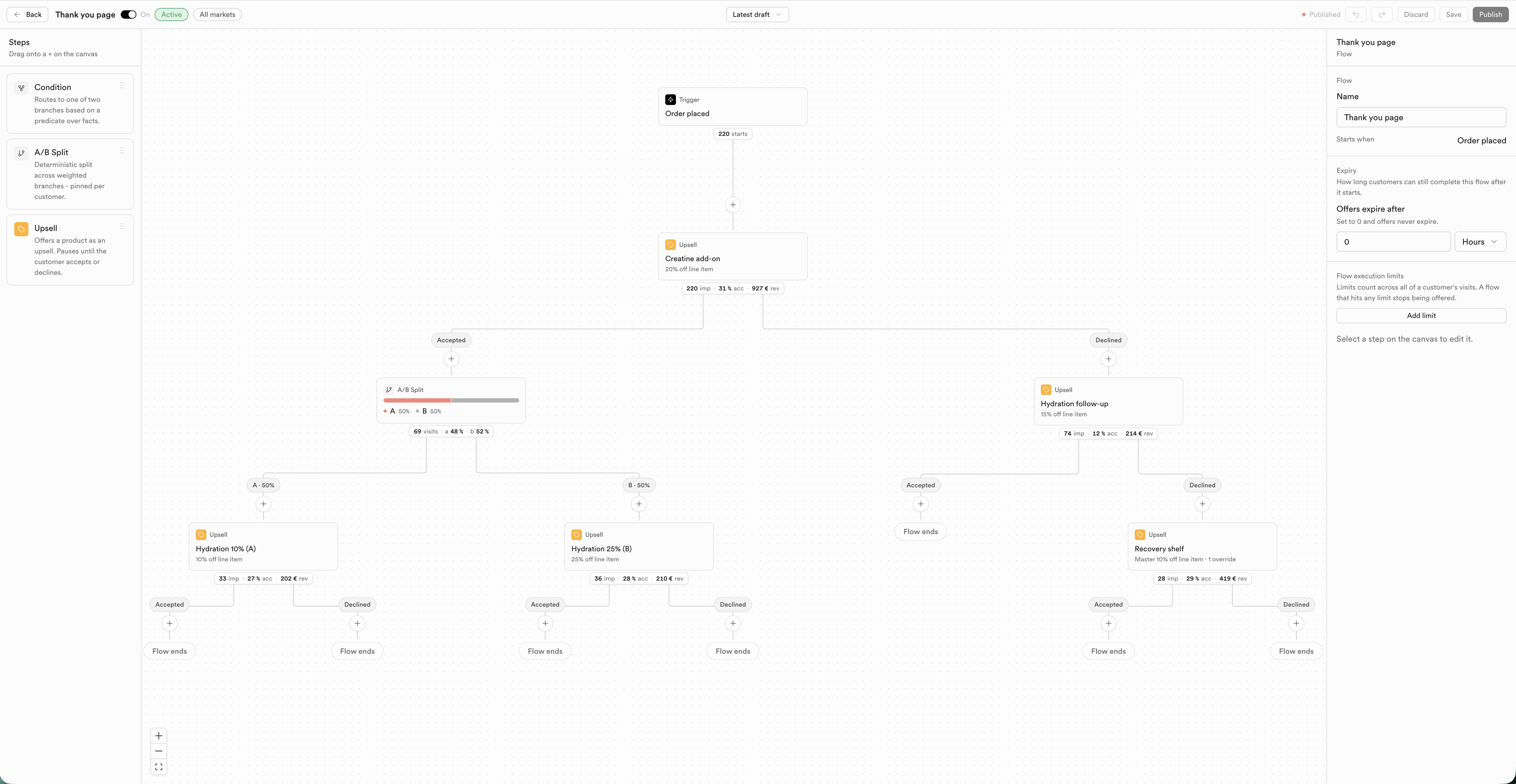
| Control | What it does |
|---|
| On / Off | Activates or pauses the published flow |
| Save | Saves the current draft |
| Publish | Publishes the draft so it can run |
| Discard | Drops unpublished changes |
| Markets | Scope which markets the flow targets (when the host app supports it) |
| Latest draft | Version / draft picker |
Exact shell controls can vary slightly by product; Upsells documents the full version history UI in Upsells → Flow builder.
| Step | What it does |
|---|
| Condition | Routes the flow into branches based on a predicate over facts |
| A/B Split | Deterministic split of traffic across weighted branches, pinned per customer |
| Offer | Upsell, discount, message, free gift, subscription action, or store credit - pauses until accept/decline when the kind requires it |
Canvas nodes can show live stats (starts, impressions, accept rate, revenue) once the flow has traffic.
| Field | Notes |
|---|
| Name | Internal name; empty displays as “Untitled flow” |
| Field | Notes |
|---|
| Offers expire after | Minutes / hours / days (or duration). How long customers can still complete the flow after it starts |
Optional list of caps. Each cap:
| Field | Options |
|---|
| Scope | Per customer / Per order (label may be subject-specific) / Store-wide |
| Consume on | Shown / Accepted / Redeemed |
| Limit | Max count in the window |
| Window | No time limit / 1 / 7 / 30 / 90 / 365 days |
| Field | Notes |
|---|
| Starts when | Read-only label for this surface (e.g. Order placed, Payment completed) |
| Entry condition | Optional gate using the same condition builder as Condition steps |
| Field | Notes |
|---|
| Predicate | Full AND/OR tree with field, operator, and value - see Conditions |
| Field | Notes |
|---|
| Branches | Weights are seeded from the palette (often 50/50); inspector may show weights as read-only. Split is deterministic and pinned per customer |
Non-protected nodes expose Delete. Removing an Offer that has accept/decline children may offer keep-edge options.