Shipping
Recalculate shipping after an edit and choose which methods customers can pick.
Shipping recalculation runs the shipping flow again when an edit can change rates, and optionally lets customers pick a new method.
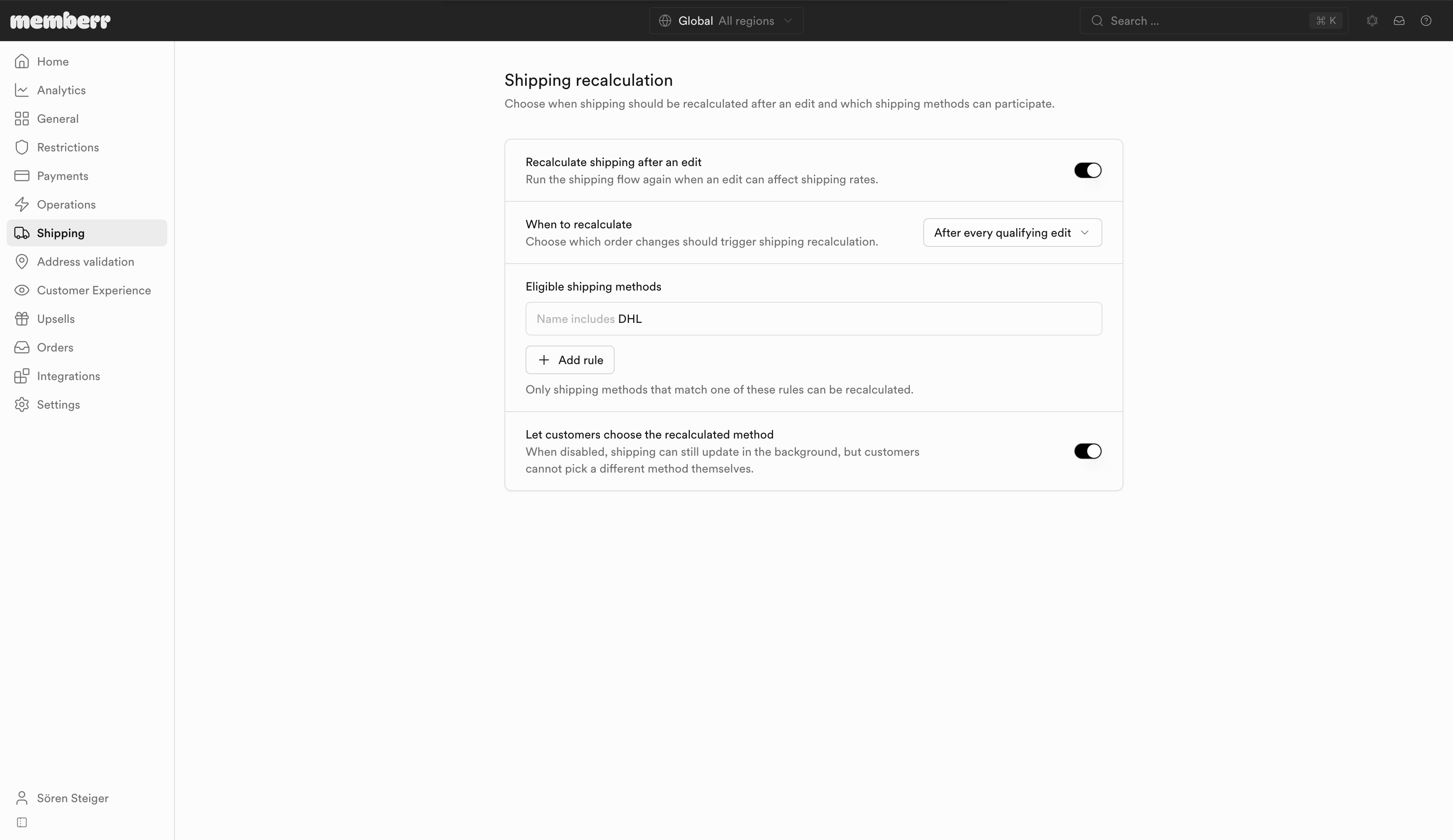
Settings
| Setting | What it does |
|---|---|
| Recalculate shipping after an edit | Run the shipping flow again when an edit can affect shipping rates. |
| When to recalculate | Choose which order changes should trigger shipping recalculation. |
| Eligible shipping methods | Only shipping methods that match one of these rules can be recalculated. |
| Let customers choose the recalculated method | When disabled, shipping can still update in the background, but customers cannot pick a different method themselves. |
When to recalculate
| Option | What it does |
|---|---|
| After every qualifying edit | Recalculate whenever an edit can affect shipping. |
| Only when free-shipping eligibility changes | Recalculate only when the edit crosses a free-shipping threshold. |
Method rules
Add rules so only matching methods participate. Match types:
- Name matches exactly
- Name starts with
- Name includes
Example: Name includes DHL limits recalculation to DHL-named rates.
If recalculation is on but no method rules match, the shipping flow has nothing to update - add at least one rule. If customer selection is off, rates can still change in the background without a customer picker.